
Most people don’t Realize this but a lot of apps are quietly using your data to train their AI systems by default. That can include your messages, photos, voice inputs even the way you type and phrase things. That’s why I decided to inform you about this – how to opt out of AI training and protect your data? At least you should have an option to decide if you want them to use your data.
If you’ve used social media, AI tools or even everyday productivity apps, there’s a fair chance your data has already been used behind the scenes to “improve” their models.
Here’s the part most people miss: you can actually switch a lot of this off and it doesn’t take hours.
In about 15 minutes, you can limit how much of your data is being used. I’ll walk you through exactly how to do it, step by step so you’re back in control of what you share (and what you don’t).
If you’re worried your phone or apps are already compromised, check this Ultimate guide on Phone Security– everything you need to know to keep your phone safe.
How to Opt Out of AI Training
If you’re short on time, do this:
- Turn off AI data sharing in app privacy settings
- Disable “Improve the model” or training options
- Review your account privacy dashboards
- Submit opt-out requests where required
- Delete unused apps that still access your data
Now let’s go platform by platform.
How to Opt Out of AI Training on Major Platforms
How to Stop AI Training on Instagram & Facebook (Meta)
Meta uses your posts, captions, and interactions to train its AI systems.
What to do:
- Go to Settings & Privacy
- Open Privacy Center
- Find AI at Meta
- Look for “Right to Object”
- Submit the opt-out form
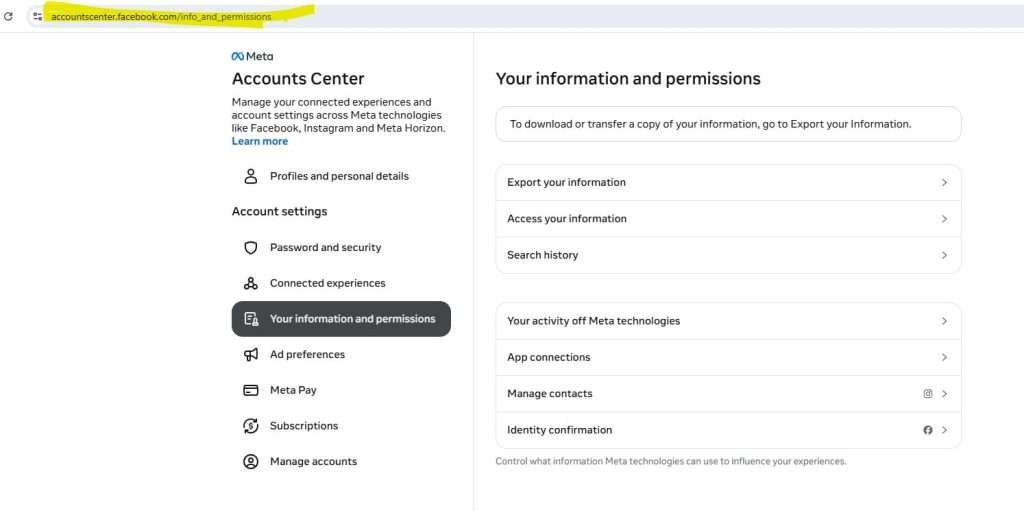
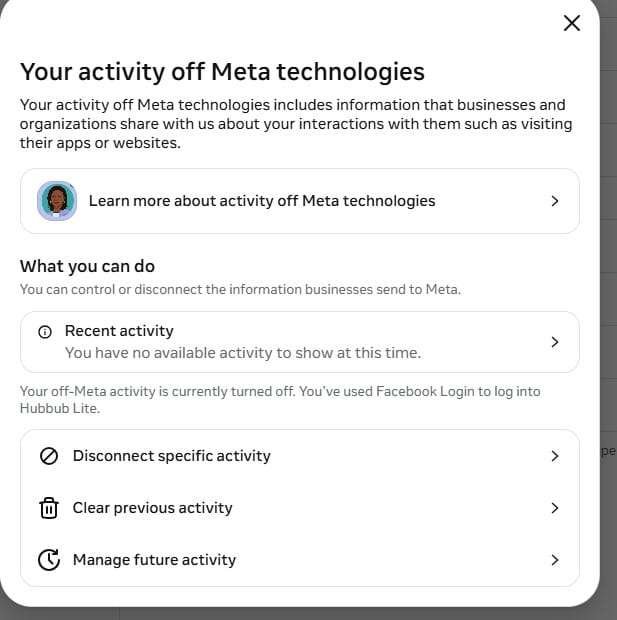
You can make changes in Facebook account permission here.
Important:
This option can be hard to find. Search the page for “AI” or “Generative AI” if needed.
How to Opt Out of AI Training on X (Twitter)
X uses your posts to train its AI model (Grok).
What to do:
- Go to Settings → Privacy and Safety
- Open Grok / AI settings
- Turn OFF data sharing
Once disabled, your posts won’t be used for training going forward.
How to Disable AI Data Usage on LinkedIn
LinkedIn uses your posts and profile data to improve AI features.
What to do:
- Go to Settings
- Click Data Privacy
- Find Data for Generative AI Improvement
- Toggle it OFF
How to Stop ChatGPT From Using Your Data
ChatGPT may use conversations to improve its models (depending on your settings).
What to do:
- Go to Settings
- Open Data Controls
- Turn OFF “Improve the model for everyone”
Important:
- This may disable chat history
- Copy anything important before switching it off
If scammers already have your data, they can exploit it using AI-powered phishing
How to Opt Out of AI Training on Adobe
Adobe may analyze your content to improve AI tools.
What to do:
- Log into your account via browser
- Go to Privacy Settings
- Find Content Analysis
- Turn it OFF
How to Stop AI Training on Google Services
Google uses activity data across its ecosystem.
What to do:
- Go to Google Account → Data & Privacy
- Turn OFF:
- Web & App Activity
- Voice & Audio Activity
- Review AI-related settings (Gemini/Bard if enabled)
How to Limit AI Data Use on Microsoft
Microsoft collects data through Copilot and other services.
What to do:
- Visit Microsoft Privacy Dashboard
- Review activity data
- Clear or disable tracking where possible
How to Reduce AI Data Collection on Apple Devices
Apple focuses on privacy but still collects some data.
What to do:
- Go to Settings → Privacy & Security
- Open Analytics & Improvements
- Turn OFF:
- Share iPhone Analytics
- Improve Siri & Dictation
Explore our curated family safety toolbox ; free cybersecurity tools and trusted products that help protect your data, prevent identity theft, and keep your digital life safe at home or on the go.
I look forward to connecting with you and sharing practical tips, guidance, and support to help you stay informed and safe online. Let’s stay connected and protect ourselves together.
What Happens If You Don’t Opt Out?
If you leave settings as default:
- Your data may be stored long-term
- Used to train future AI systems
- Help improve tools that may eventually replace human tasks
- In rare cases, patterns from your data could appear in AI outputs
You’re not being “hacked”—but you are contributing data without realizing it.
The Hidden Loophole: “Legitimate Interest”
Some companies don’t ask for permission at all.
They rely on a legal concept called legitimate interest.
This means:
- They can use your data unless you explicitly opt out
- Opt-out links are often buried in emails or settings
What to do:
- Search emails for: “AI”, “training”, or “privacy update”
- Look for opt-out links
- Submit requests manually when needed
To further understand About AI in our what exactly is AI safety for you and your family guide.
Check What Your Apps Are Doing (Hidden Tracking)
On iPhone
- Go to Settings → Privacy & Security → App Privacy Report
- See which apps access your data and when
On Android
- Go to Privacy Dashboard
- Check access to:
- Microphone
- Camera
- Location
Red flag:
If an app is accessing data it doesn’t need – delete it.
The 15-Minute AI Privacy Audit
If you only do one thing today:
- Turn off AI training in your main apps
- Review your phone’s privacy dashboard
- Remove unused apps
- Check one recent “privacy policy update” email
That’s it.
You don’t need to disappear from the internet, just stop being the easiest source of data.
Want to go further? Here’s how to stop oversharing on social media and protect your data and yourself.
If you’re worried your phone is already compromised, read: Codes to Check If Your Phone Is Hacked
These will help you Further
Check our AI Hub to understand AI further.
Digital Air-Gapping for Kids: Why “Safe” Tech is a Cybersecurity Illusion
What to Do Immediately After Identity Theft (Step-by-Step Recovery Guide)
Explore our curated family safety toolbox ; free cybersecurity tools and trusted products that help protect your data, prevent identity theft, and keep your digital life safe at home or on the go.



This is so interesting and scary at the same time. Thanks for sharing this!
Welcome Liliane. I agree with you – these new changes are intriguing as well as scary.
It’s scary that we need to resort to all of these things to remain safe online.
Agree Davindra, its becoming scary- awareness is the only key.
Incredibly informative and quite scary, thank your for sharing