
Your Android was fast when you first got it. Now it lags, freezes, and takes forever to open apps. Sound familiar?
It’s not slow because its old but its small habits, overloaded storage, heavy apps, and background processes can quietly slow everything down over time. Here are 8 things slowing down your Android phone without you knowing and simple ways to speed it up again.
1. You Have Too Many Apps Installed
Every app you install takes up storage and runs background processes even when you’re not using it. The more apps you have, the more your phone is juggling behind the scenes, which can make your Android phone lag over time.
Some apps also constantly refresh data, send notifications, or run hidden services in the background without you noticing.
Fix it: Go through your apps and delete anything you haven’t opened in the last 2 months. If you can access it through a browser (like news site), you probably don’t need the app installed.
2. You’re Using Heavy, Resource-Hungry Apps
Some apps are just greedy. Facebook, Snapchat, and most battle royale games are notorious for eating up memory and slowing everything down.
Fix it: Look for “Lite” versions of your most-used apps. Facebook Lite, for example, is a fraction of the size of the full app and runs much smoother on most phones. Search the app in the Google Play Store and look for a “Similar app available” banner — that’s usually where the Lite version lives.
3. You’re Not Keeping Apps Updated
Outdated apps have bugs. Those bugs can cause crashes, slowdowns, and weird behaviour on your phone. Updates fix them.
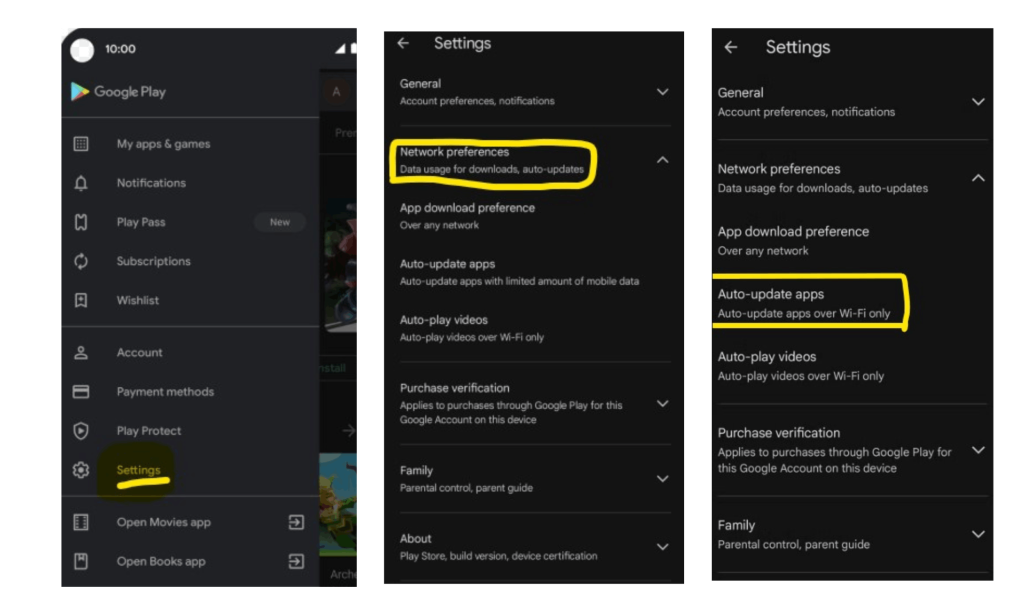
Fix it: Turn on automatic updates so you don’t have to think about it:
- Open the Google Play Store
- Tap your profile icon (top right)
- Go to Settings > Network preferences > Auto-update apps
- Select Over Wi-Fi only and tap Done
4. Your Storage Is Nearly Full
When your phone storage gets too full, everything slows down not just apps, but the whole system.
Your Android needs free space to create temporary files, process updates, and run apps properly. This is one of the biggest reasons people search how to stop Android phone from lagging.
Fix it: Go to Settings > Storage to see what’s taking up space. Photos and videos are usually the biggest culprits. Back them up to Google Photos and delete them from your device. Aim to keep at least 10–15% of your storage free at all times.
Bonus Tip: Check for Suspicious or Malware Apps
Sometimes a slow Android phone isn’t just caused by clutter, it can also be caused by malicious or poorly designed apps running constantly in the background.
Certain apps secretly consume battery, use processing power, or flood your phone with ads and pop-ups.
Warning signs include:
- Sudden battery drain
- Overheating
- Random pop-ups
- High data usage
- Apps you don’t remember installing
Fix it: Remove suspicious apps, especially ones installed recently. Then run a scan using Google Play Protect:
- Open the Google Play Store
- Tap your profile icon
- Tap Play Protect
- Run a security scan
If your phone suddenly became slow overnight – malware or a bad app update could be the reason. If you suspect that your phone could be hacked then download the simple step by step checklist below. No tech skill needed.
5. Your Home Screen Is Cluttered With Widgets
Widgets look useful, but every live widget is constantly updating information in the background. Weather widgets, stock tickers, news feeds, and live clocks all use memory and battery power. A home screen packed with widgets can quietly slow your Android phone down
Fix it: Strip your home screen back to the basics. Keep one or two widgets you actually use and remove the rest. It’s a small change, but it frees up resources instantly.
6. You Never Restart Your Phone
Most people charge their phone every night but never actually turn it off. Your phone needs an occasional fresh start to clear out temporary files and fix minor glitches.
Fix it: Restart your phone at least once a week. It takes two minutes and you’ll often notice an immediate improvement in speed.
And here is how to stop SPAM calls on Android phone.

7. You’re Using a Task Killer App
Task killer apps promise to speed up your phone by force-closing background apps. It sounds helpful but it often makes things worse.
Android already manages memory automatically. When a task killer force-closes an app, Android usually restarts it again, which actually uses more resources.
Fix it: Uninstall any task killer apps you have. Trust Android to handle memory management on its own.
8. You Keep Force-Closing Apps
Swiping apps away from your recent apps might feel like good housekeeping, but it’s the same problem as task killers. Every time you force-close an app and reopen it, your phone has to start it from scratch which takes more power than just leaving it running.
Fix it: Only close apps if they’re frozen, crashing, or clearly misbehaving. Otherwise, let Android manage them automatically.
And if you want to know if your iPhone or your friend’s iPhone is hacked then here are signs and fixes to check if your iPhone is hacked.
FAQ- 8 Things Slowing Down Your Android Phone
What Can Make an Android Phone Slow?
An Android phone can slow down because of low storage space, too many installed apps, heavy background processes, outdated apps, overheating, malware, or too many widgets running at once. Even simple habits like never restarting your phone can affect performance over time.
How Do I Find Out What Is Slowing Down My Android Phone?
Start by checking your storage usage, battery usage, and recently installed apps. Go to Settings > Battery and Settings > Storage to identify apps using too many resources.
Background apps, nearly full storage, overheating, and resource-heavy apps are some of the most common causes of Android lag.
Why Is My Android Slow All of a Sudden?
If your Android suddenly became slow, it could be caused by a recent app update, low storage space, too may background apps, malware or suspicious apps.
Restarting your phone, deleting unused apps and clearing storage often fixes sudden slowdowns quickly.
Your Phone Will Thank You
A slow Android phone doesn’t always mean it’s time to buy a new one. In many cases, small changes like clearing storage, removing unused apps, restarting weekly, and avoiding task killer apps, can dramatically improve performance.
If you’re trying to speed up your Android phone or wondering why your Android lags for no reason, start with the simple fixes above first. Most people notice improvements within minutes.
Want more practical Android safety and performance tips? Check out our Phone Security Hub for simple guides on phone security, scam protection, and keeping your device running smoothly.
Explore our curated Family safety toolbox ; free cybersecurity tools and trusted products that help protect your data, prevent identity theft, and keep your digital life safe at home or on the go.