
Something feels off with your Facebook account. Maybe you got a login alert you didn’t trigger. Maybe a friend messaged you asking about something strange you apparently posted. Maybe you just can’t log in at all.
Knowing how to know if your Facebook account has been hacked and what to do next can make the difference between a quick recovery and weeks of damage control.
This guide covers the warning signs, how to check your account right now, what to do if you’ve been hacked, and how to lock your account down so it doesn’t happen again.
1.Think your Facebook account has been hacked?
If your Facebook account has been hacked, the first warning signs often appear quietly.
Check for these signs:
- Password changed unexpectedly
- Login alerts from unknown devices
- Messages you didn’t send
- Friends receiving spam
- Unknown email or phone number added
- Posts you didn’t make
- You’re suddenly logged out
If you notice one or more of these, follow the recovery steps below.
Signs friends might tell you about:
- Friends receive suspicious messages or links from your account
- Your profile picture, cover photo, or name suddenly changed
- Your account is sending spam or scam links to your contacts
The most serious sign: you try to log in and your password no longer works and the recovery code goes to an email or phone number you don’t recognize. This means a hacker has changed your credentials and is actively controlling your account.
2. Still wondering how to know if your Facebook account has been hacked?
Even if you haven’t noticed anything obvious, it’s worth doing a quick check. Here’s how to see if anyone else has been accessing your account.
Step 1: Check where you’re logged in
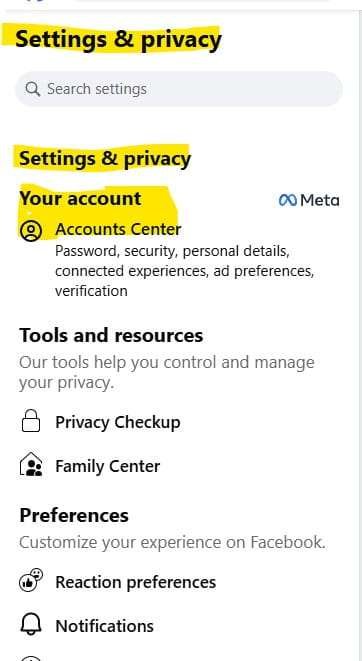
- Open Facebook and tap your profile photo → Settings & privacy → Settings
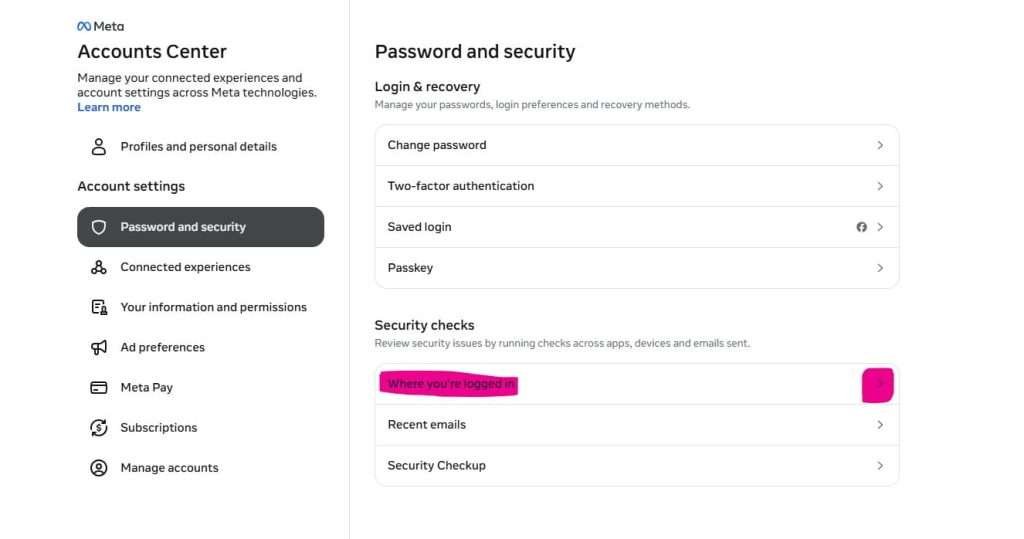
- Tap Accounts Centre (on the left panel on desktop, or scroll down on mobile)
- Tap Password and security
- Tap Where you’re logged in
- Select Facebook from the list of accounts
You’ll see every device and location currently logged into your Facebook account, with timestamps. Go through this list carefully.
What to look for: logins from cities or countries you haven’t been to, devices you don’t own (a Windows PC if you only use iPhone, for example), or sessions with very recent timestamps from places you weren’t at that time.
If you see anything you don’t recognise, tap it and select Log out to end that session immediately.
Step 2: Check recent account activity
- Go to Settings & privacy → Settings
- Tap Activity log (on desktop, it appears in the middle of the page)
- Look through recent posts, comments, and logins for anything you don’t recognise
Step 3: Check your account details haven’t been changed
Go to Settings & privacy → Settings → Personal information and verify:
- Your email address is still yours
- Your phone number is still yours
- Your name and birthday are unchanged
If any of these have been changed, your account has been compromised.
3. How did my Facebook account get hacked?
Understanding how it happened helps you fix the right problem and stop it from happening again.
Most Facebook account takeovers in 2025 happened through one of three ways:
Phishing (43% of cases): You clicked a link in a message, an email, or a post that took you to a fake Facebook login page. You entered your username and password, which went directly to the hacker. The “Is this you in the video?” message in Facebook Messenger is one of the most common phishing lures, with a click-through rate far higher than most email scams.
Credential stuffing (31% of cases): Your Facebook password was the same as a password you used on another site that was breached. Hackers run those stolen credentials automatically against Facebook and if your password matches, they’re in.
Compromised email account (18% of cases): If a hacker gets into your email account first, they can use the “forgot password” function to reset your Facebook password and lock you out.
This is why the advice to use unique passwords for every account and to secure your email first is so important. See our guide: How to secure your email account from hackers
4. What to do if your Facebook account has been hacked
Act quickly. The faster you respond, the less damage can be done. Work through these steps in order.
If you can still log in:
Step 1: Change your password immediately
- Go to Settings & privacy → Settings → Accounts Centre
- Tap Password and security → Change password
- Select Facebook from your accounts
- Enter your current password and create a new one — use a strong passphrase you don’t use anywhere else
Step 2: Log out of all other sessions
- Go back to Where you’re logged in (Settings → Accounts Centre → Password and security)
- Tap Log out of all sessions to kick out any other active sessions
Step 3: Review and remove apps you don’t recognize
- Go to Settings & privacy → Settings → Apps and websites
- Remove any apps or services you don’t recognise or no longer use
- Hackers sometimes connect malicious apps to gain ongoing access even after you change your password
Step 4: Report the hack to Facebook
Go to facebook.com/hacked , this is Facebook’s official compromised account tool. Even if you’ve already secured your account, reporting it lets Meta flag any suspicious activity and review the account.
Check Facebook marketplace shipping scam that has duped many innocent Facebook users
Step 5: Enable two-factor authentication
If you didn’t already have it on, turn it on now:
- Go to Settings → Accounts Centre → Password and security → Two-factor authentication
- Select Facebook
- Choose an authentication app (more secure than SMS) or text message as your second factor
- Follow the setup steps
If you’ve been locked out: the hacker changed your email or password:
This is more serious but still recoverable in most cases.
Option 1: Use Facebook’s account recovery tool
Go to facebook.com/hacked on any browser. Facebook will ask you to identify your account and walk you through recovery options based on what information the hacker changed.
Option 2: Try the “Forgot password” flow
- Go to facebook.com and click Forgot password
- Enter the email or phone number associated with your account
- If the hacker hasn’t changed these yet, Facebook will send a recovery code
Option 3: If the hacker changed your email AND phone number
This is the hardest scenario. Go to facebook.com/hacked and select the option that matches your situation. Facebook may ask you to:
- Identify friends in photos (to verify your identity)
- Upload a government-issued ID
- Wait while Meta’s team reviews your case
This process can take several days. In the meantime, post on another social media account or ask a friend to tag you in a post warning your contacts not to respond to messages from your account.
Also, check 7 WhatsApp Hacked signs you Shouldn’t Ignore.
5. Warn your friends
A hacked Facebook account is often used immediately to send scam links or messages to all your contacts. Your friends don’t know your account is compromised so they’ll think the message is from you.
If you can access any other account, Instagram, email, a text message let your close contacts know your Facebook has been hacked and to ignore anything sent from your account until further notice.
6. How to secure your Facebook account so it doesn’t happen again
Once you’ve regained control, lock things down properly.
Use a strong, unique password. Never use your Facebook password on any other site. Use a passphrase or let a password manager generate something random. See our guide: How to create a strong password
Turn on two-factor authentication. This is the single most effective protection. Even if someone has your password, they can’t log in without the second factor.
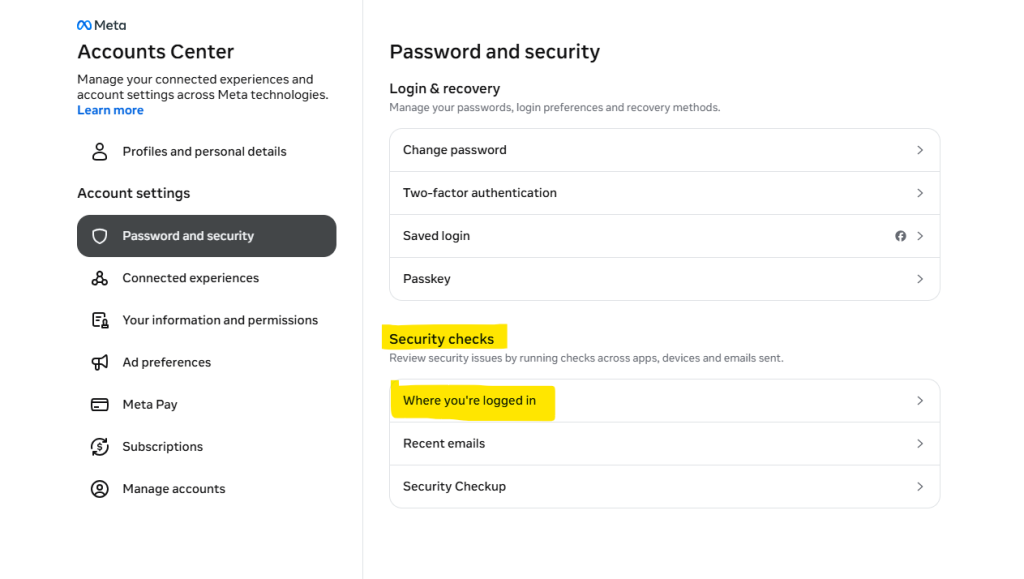
Set up login alerts. Click on your profile pic at the top right hand corner → Click on Settings & privacy → Go to Settings → Accounts Centre → Password and security → Login alerts and turn on notifications for new device logins.
You’ll get an immediate alert whenever your account is accessed from a new device or location.
Review connected apps regularly.
Go to Settings → Apps and websites and remove anything you don’t actively use. Connected apps are a common way hackers maintain access after being kicked out.
Never click login links in messages or emails. If you get a message claiming to be from Facebook, don’t click the link. Open a new browser tab, go to facebook.com directly, and check your notifications there. See our guide: How to spot a phishing email
One more layer: monitor your identity beyond Facebook
A hacked Facebook account is often a sign that your personal information is already in circulation from a previous data breach. Hackers who have your email and password from one breach will try them on Facebook, your bank, and dozens of other services.
Aura monitors your personal information across the dark web and breach databases, and sends you an alert the moment your details appear somewhere they shouldn’t so you can change your credentials before a hacker uses them.
If a friend’s Facebook account appears to be hacked and they’re sending you strange messages, don’t click anything. Let them know directly by phone, text, or another platform that their account has been compromised.
More Read for your Security Journey
The Ultimate Phone Security Hub
How to Report a Scammer on Facebook Marketplace
Safety Gifts for You and Your Loved one That Actually Protect Privacy
What to Do If You Clicked a Phishing Link: 7 Immediate Steps to Take