
You just got an email from PayPal. It says your account has been locked due to suspicious activity. There’s a big red button: “Verify your account now.” Your heart rate jumps a little.
But is the email real or is someone trying to steal your login?
Knowing how to spot a phishing email could save your bank account, your identity, and a lot of stress. Now it becoming harder than ever to spot a phishing email as scammers are use AI to write emails that look completely real. This post gives you 8 red flags to check in under 60 seconds, plus real examples of what these scam emails actually look like.
Quick checklist: Is this email real?
Run through these five checks before you click anything:
- Does the sender’s email address match the company’s real domain?
- Is the email pushing you to act urgently or threatening consequences?
- Does hovering over any links show a suspicious URL?
- Does it greet you by name or just “Dear Customer”?
- Is it asking you to confirm a password, card number, or personal details?
If you answered “no” to #1 or “yes” to any of #2–5, treat it as a scam until proven otherwise.
1. What is a phishing email and why are they harder to spot now?
A phishing email is a fake message designed to look like it came from a company or person you trust. The goal is to trick you into clicking a bad link, handing over your password, or downloading something harmful.
The name comes from “fishing” because scammers cast a wide net and wait for someone to bite.
For years, phishing emails were easy to spot. Terrible spelling, broken English, emails from “Amazoon” with a double “o.” Those days are mostly gone. Today, scammers use AI to write phishing emails that are grammatically perfect, professionally formatted, and eerily convincing. They can copy a company’s exact logo, font, and email template in minutes.
That’s why knowing the red flags matters more than ever. You can’t rely on typos to save you.
2. How to Spot a Phishing Email – 8 Red flags
These are the signs that separate a real email from a scam even when the scammer has done a convincing job.
1. The sender’s email address doesn’t match the company
This is the single most reliable way to spot a phishing email. Look past the display name, the name you see in bold and check the actual email address behind it.
A scammer can make the display name say “PayPal Customer Service,” but the actual address might be something like support@paypa1-billing.net. That’s not PayPal.
How to check: On desktop, hover your mouse over the sender name. On iPhone, tap the sender name at the top of the email to expand it. The real address appears underneath.
What to look for: misspelled domains (paypa1 instead of paypal), extra words added (amazon-security.com instead of amazon.com), or completely random domains that have nothing to do with the company.
2. There’s pressure to act immediately
Real companies don’t threaten you. Scammers do.
If an email says your account will be closed in 24 hours, your payment has failed and you must act now, or your personal information will be deleted unless you verify today that urgency is a tactic. It’s designed to stop you from thinking clearly and make you click before you check.
A real bank, a real Netflix, a real PayPal will give you time. They’ll send multiple notices. They won’t threaten to lock you out permanently if you don’t respond within the hour.
3. Links go somewhere unexpected
Never click a link in an email without checking where it actually leads first.
On desktop: Hover your mouse over the link (don’t click) and look at the bottom-left corner of your browser window. The real destination URL will appear.
On iPhone: Press and hold the link for a second. A preview will pop up showing where the link actually goes.
What you’re checking for: does the URL match the company’s real website? An email “from” your bank that links to verify-account-secure.biz is not from your bank.
4. The greeting is generic
Legitimate companies that have your account know your name. PayPal knows you’re Susan. Amazon knows you’re David. They use your name.
If an email starts with “Dear Customer,” “Dear Account Holder,” or “Dear Valued Member,” it wasn’t written for you specifically. It was blasted out to thousands of people at once. That’s a phishing tell.
One exception: some legitimate marketing emails use generic greetings. But a marketing email won’t also ask you to verify your password.
5. It asks for personal or financial information
No legitimate company will ever ask you to confirm your password, full credit card number, Social Security number, or bank account details by email.
If an email includes a form asking for this information, or a link that takes you to a page asking for it, stop. Real companies have secure portals for sensitive information. They don’t collect it through email.
6. There’s an unexpected attachment
A ZIP file you didn’t ask for. An invoice for something you never ordered. A “document” that needs you to enable macros to open it.
Attachments in phishing emails are often malware – software that installs itself on your device when you open the file.
The rule is simple: if you weren’t expecting an attachment, don’t open it. Even if the email looks like it came from someone you know.
7. The branding looks slightly off
Scammers copy company logos and email templates but they rarely get it perfect. Look for colors that are a slightly wrong shade, logos that look pixelated or stretched, email layouts that feel a little different to the real thing.
You can compare by going directly to the company’s real website (type it yourself, don’t click the link) and looking at their official emails.
8. Something just feels wrong
Trust your gut. If something feels off about an email like the tone is different, the timing is odd, the request seems unusual then trust your instinct.
A good rule: if the email is asking you to do something and you feel even slightly unsure, don’t act on it. Go directly to the company’s website by typing the address yourself, log in there, and see if there’s actually a message or issue waiting for you. If there isn’t, the email was fake.
3. Real phishing email examples and what made them dangerous
One of the best ways to learn how to spot a phishing email is to see what real ones look like. These are real scam campaigns. Knowing what they looked like helps you recognize the pattern when a new one lands in your inbox.
The fake PayPal billing alert
Scammers send an email that looks exactly like a PayPal receipt, claiming you’ve been charged $299 for a service you didn’t sign up for. The email has PayPal’s logo, PayPal’s colours, and a big button that says “Cancel this charge.”
The red flag: the sender address is service@paypal-billing-support.com not paypal.com. And the cancel link leads to a fake login page designed to steal your PayPal credentials.
What a real PayPal email would do: show the transaction in your actual PayPal account, which you’d find by going to paypal.com yourself.
The fake IRS tax refund
An email arrives saying you’re owed a tax refund and need to confirm your bank details to receive it. It uses IRS branding and says the offer expires in 48 hours.
The red flag: the IRS never contacts taxpayers by email to initiate refunds. They send letters by mail. Any email claiming to be from the IRS asking for bank information is a scam, no exceptions.
The fake “unusual sign-in” alert
You get an email from “Microsoft” saying someone tried to log into your account from an unfamiliar location. It asks you to verify your identity by clicking a link.
The red flag: the link goes to verify-microsoft-account.net – not microsoft.com. The domain is close enough to fool a quick glance, but it’s not Microsoft’s real website.
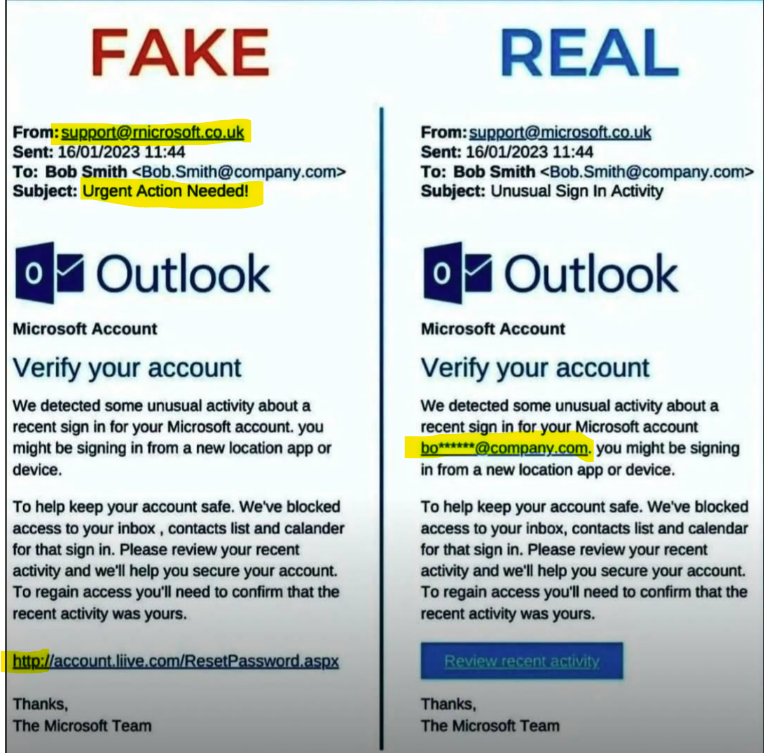
There are four obvious warning signs in this fake email:
- The sender’s email address is misspelled
The email comes from support@rnicrosoft.co.uk. At first glance it looks like “microsoft,” but it’s actually “rn” instead of “m” – a common trick scammers use to fool people. - The subject line creates urgency
The subject, “Urgent Action Needed,” is designed to pressure you into acting quickly without stopping to think. - It doesn’t address you by name
Legitimate companies usually include your name or account details. This email uses a generic greeting and never mentions the recipient’s email address or name. - The link is not secure
The link at the bottom uses “http” instead of “https.” While not every phishing email uses an insecure link, a missing HTTPS connection is another red flag that the website may not be legitimate.
How Safe Is Your Digital Life?
Take our free 2-minute Digital Safety Check and find out how well you know the everyday habits that help protect your accounts, devices and personal information.
4. What to do if you think you’ve received a phishing email
If you think you know how to spot a phishing email but you’re still not 100% sure about a particular message, here’s exactly what to do:
- Don’t click anything. Not the links, not the unsubscribe button, not the “view in browser” link. Nothing.
- Check the sender address. Hover or tap to see the real address behind the display name.
- Report it. Most email apps have a built-in option to report phishing. This helps protect other people.
- Delete it. Once reported, delete the email. Don’t forward it to friends or family “to warn them” for that just spreads the risk.
If the email claims to be from a company you actually use like your bank, PayPal, Amazon, log into that account directly by typing the address into your browser. If there’s a real issue, it will show up there.
5. What if you already clicked a link?
It happens. You clicked before you thought, and now you’re worried.
First: don’t panic. Clicking a link doesn’t automatically mean your accounts have been compromised. What matters most is what happened after the click, specifically, whether you entered any information on the page that opened.
If you entered a password, credit card number, or any personal details on the page, act quickly: change the password for that account immediately (from a different device if you can), and contact your bank if financial details were involved.
One more layer of protection
Now that you know how to spot a phishing email, there’s one more thing worth doing. Even if you spot every phishing email that comes your way, your personal information may already be exposed from a past data breach without you knowing.
Aura monitors your personal information across the web and alerts you the moment your details appear in a breach, on the dark web, or in a scam database. That way, even if a scammer already has your email address or password from a previous leak, you’ll know about it before they can use it.
Try Aura to monitor your account.
Found this useful? Share it with someone who might need it. Phishing emails don’t just target tech-savvy people. They’re designed to catch anyone on a busy day.
Phone Security Hub || Scam Hub || AI safety Hub ||
Explore our curated Family safety toolbox ; free safety tools and trusted products that help protect your data on phone and laptop, prevent identity theft, and keep your digital life safe at home or on the go.

Great tips! Phishing emails are becoming more convincing every day, so it’s so important to know what warning signs to look for before clicking anything. Thanks for helping spread awareness and keep people safer online!
Thanks for this information. With all the messages going around today we all need to be watchful. This goes the same for phone calls coming in. How about a phishing phone call post or a post on real good fake phone calls. Scammers are getting really sophisticated. Im loving all this info. 🥰
Thanks Maryann- for your feedback. I totally agree with you of many scams going around and the best way to beat the scammer is mindfulness and patience. Be mindful of what you click on or sites your visit and download from. Giving yourself 10 secs will save you from phish. For phone call phishing and video scams- there are lots of posts but you can start with this: https://cybertechfreedom.com/how-hackers-use-ai-for-phishing/
This is very good information. I have got several fake emails from “Pay Pal” claiming something is wrong with my account. I got to the point that if I get any mail from a company I just go to the source myself and avoid clicking.
I’m so happy you addressed this. Phishing emails and really any other kinds of emails are driving me nuts! Shared this with friends and family so they can keep their information safe and learn how to spot these dumb emails. Thank you for sharing!
I’ve never thought to check the “from” section to check if it matched the company name. Great tip, thanks!
Great information! I love that your posts are always informative and help keep me safe from scams! It’s important to know how to protect yourself and avoid scams. They are everywhere these days!